How to Download Hand Histories from Natural8 / GGPoker
Step-by-step guide with screenshots: use PokerCraft to export your Natural8 (GGPoker) hand histories for AI analysis and coaching.
Why Download Your Hand Histories?
Your hand histories are a goldmine of information. By analyzing them, you can:
- Find your biggest leaks — spots where you consistently lose money
- Track your win rate over time and across different games
- Get AI coaching — upload to DEEPFOLD for instant professional analysis
Step-by-Step: Downloading from Natural8 / GGPoker
Natural8 runs on the GGPoker network, so the hand history export process is the same. You'll use the built-in PokerCraft tool to download your session data.
Step 1: Open Settings
Launch the Natural8 / GGPoker desktop client (hand history export is not available on the mobile app). Click the gear icon (⚙️) in the top-right corner of the lobby to open the settings panel.

Step 2: Open PokerCraft
In the settings window, look at the bottom-left corner — you'll see the PokerCraft icon (a red book icon). Click it to open the PokerCraft analytics tool. PokerCraft is GGPoker's built-in hand history manager and statistics tracker.
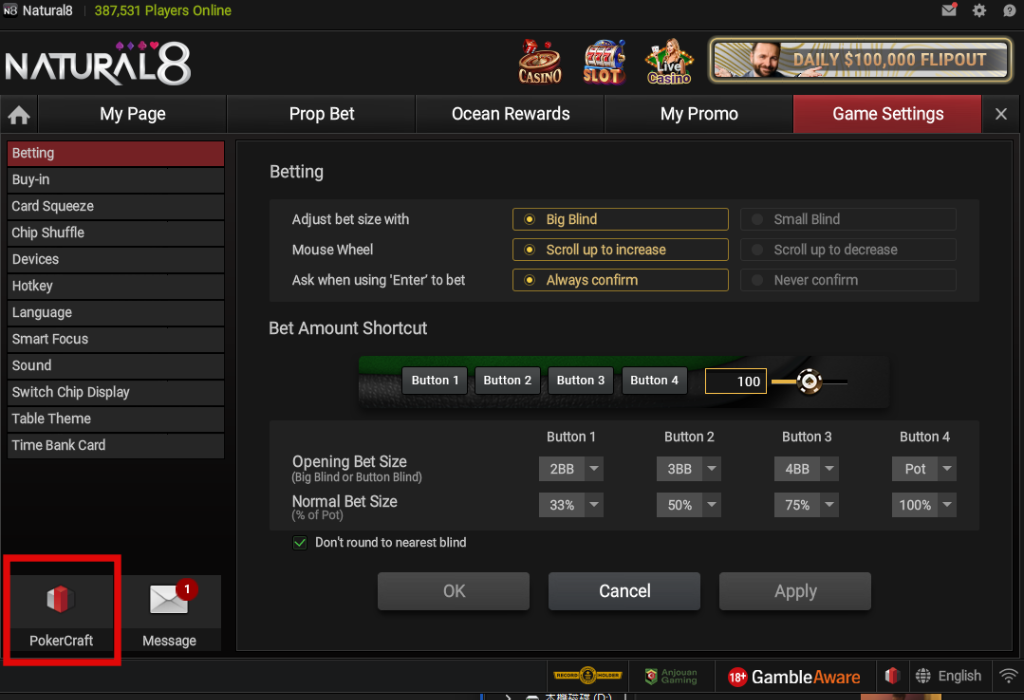
Step 3: Select Sessions and Download
Once PokerCraft opens, you'll see your session history. Here's how to download:
- Choose the game type from the left sidebar (e.g., Rush & Cash, Hold'em, PLO, etc.)
- Use the filters at the top (Date, Game, Stakes) to narrow down your sessions
- Check the boxes next to the sessions you want to export
- Click the "Download" button in the top-right corner
- Your hand histories will be saved as text files to your computer
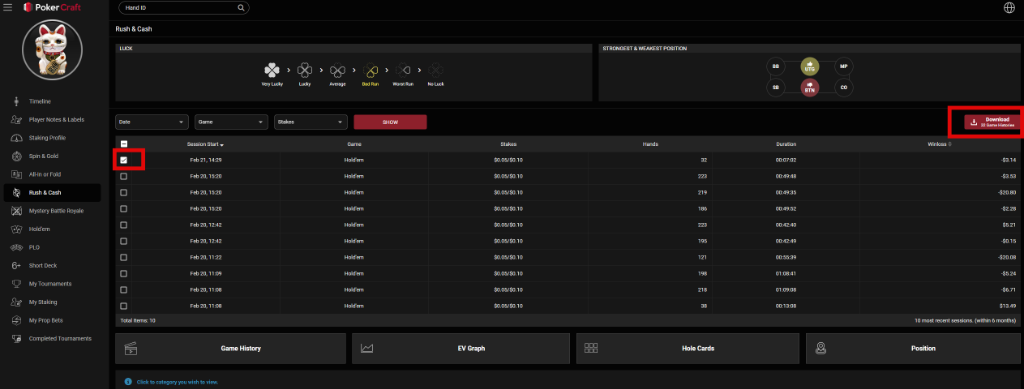
💡 Tip: PokerCraft lets you download up to the 10 most recent sessions (within 6 months). Make sure to export regularly so you don't lose older data.
Using Your Hand Histories with DEEPFOLD
Once you have the downloaded files:
- Go to DEEPFOLD AI Coach
- Click the paperclip icon (📎) or drag and drop your file
- The AI will instantly parse and analyze your hands
- Review critical errors, get coaching advice, and ask follow-up questions
Other Supported Platforms
DEEPFOLD also supports hand histories from:
- PokerStars (.txt format)
- WPT Global
- 888poker
- PartyPoker
- WPN (ACR)
- iPoker
- QQPK
Pro Tips
- Export regularly — PokerCraft only keeps the last 10 sessions within 6 months. Don't wait!
- Focus on losing sessions — These contain the most valuable learning opportunities.
- Use the bookmark feature — DEEPFOLD automatically marks critical error hands for focused review.
🎯 Ready to analyze? Upload your first hand history to DEEPFOLD and get instant AI coaching.